MMatchRight

All your application needs, in one place.

Fifty browser tabs, a spreadsheet and a folder of drafts is no way to run a match year. Put the whole application in one place with MatchRight.

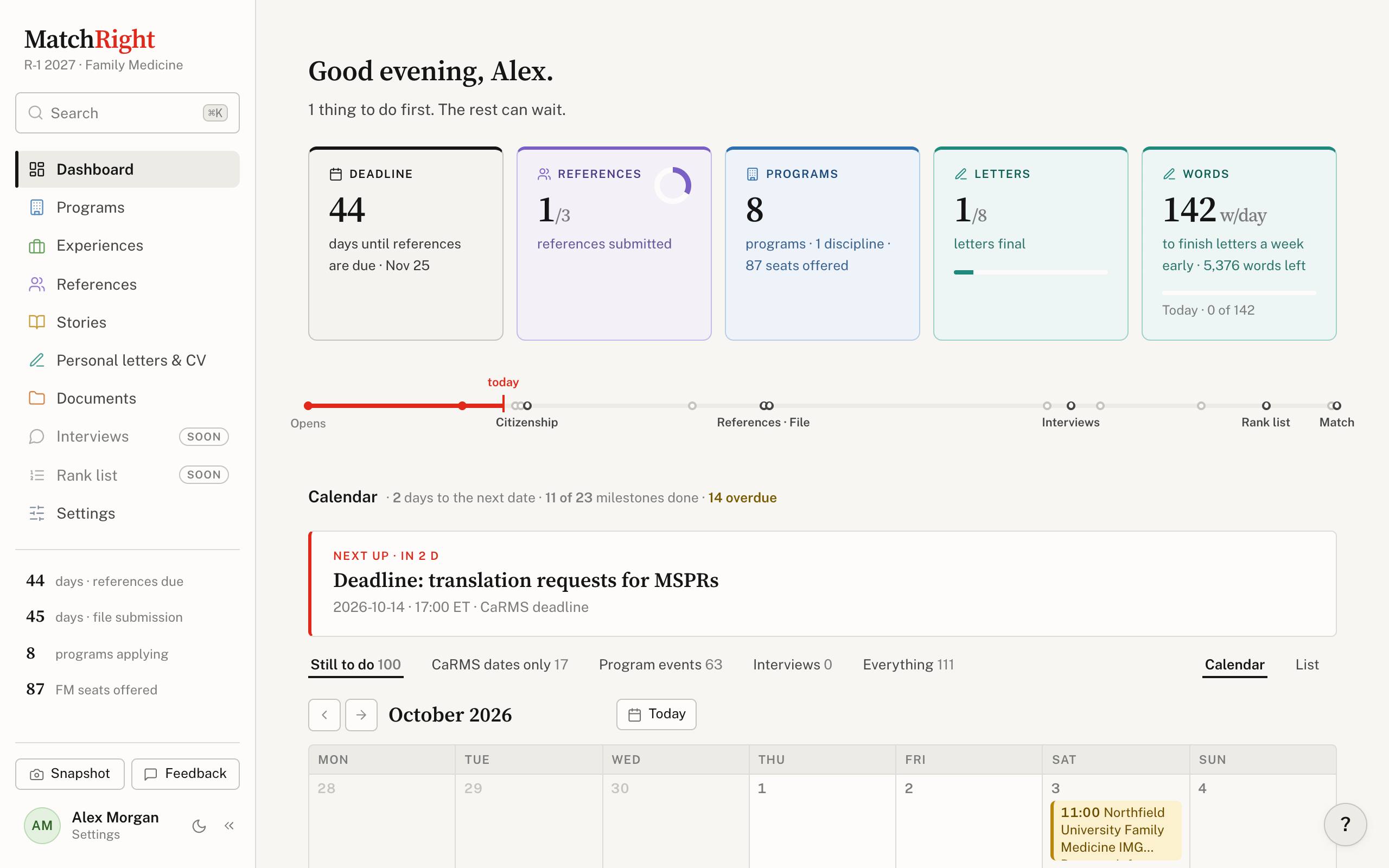
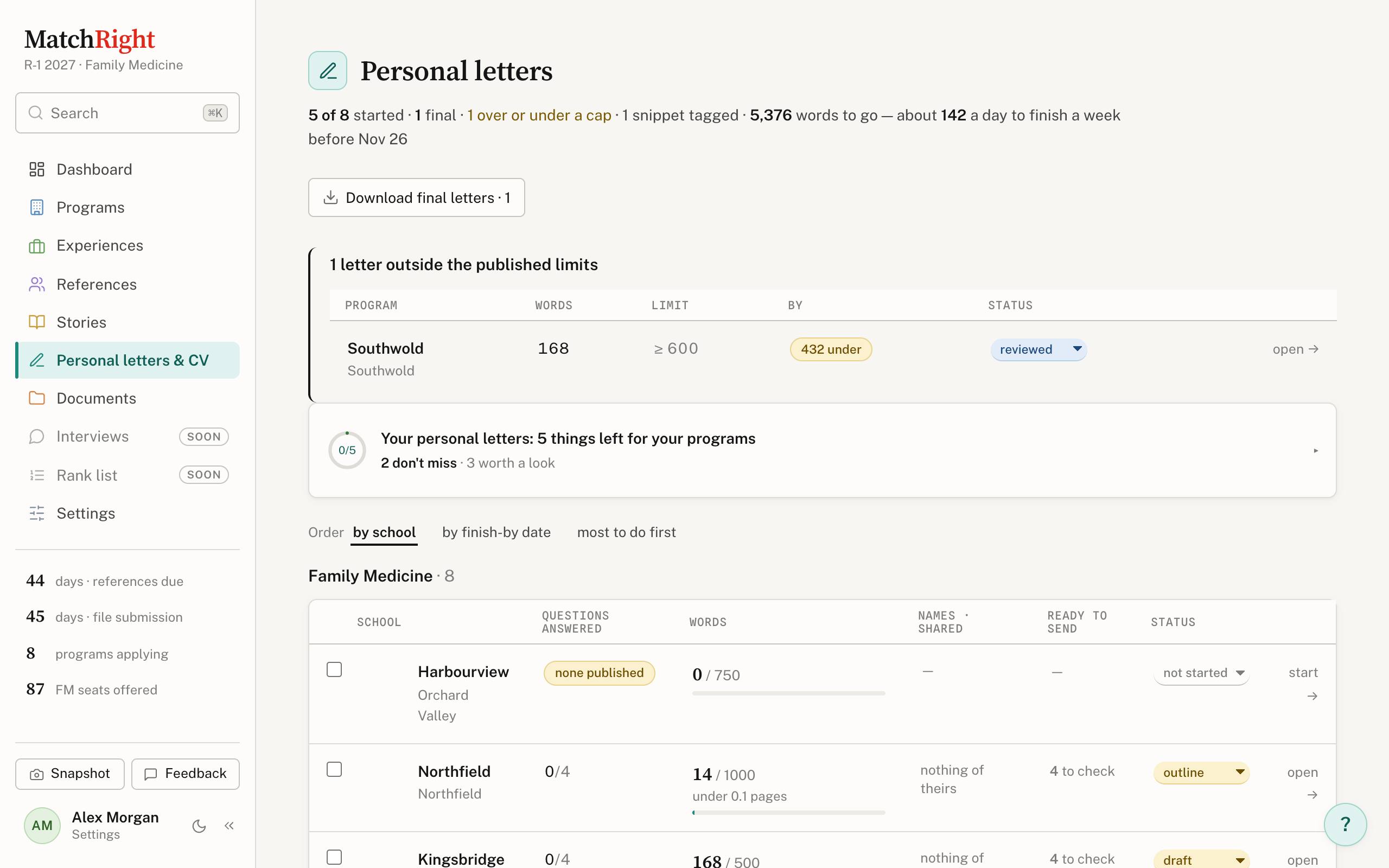
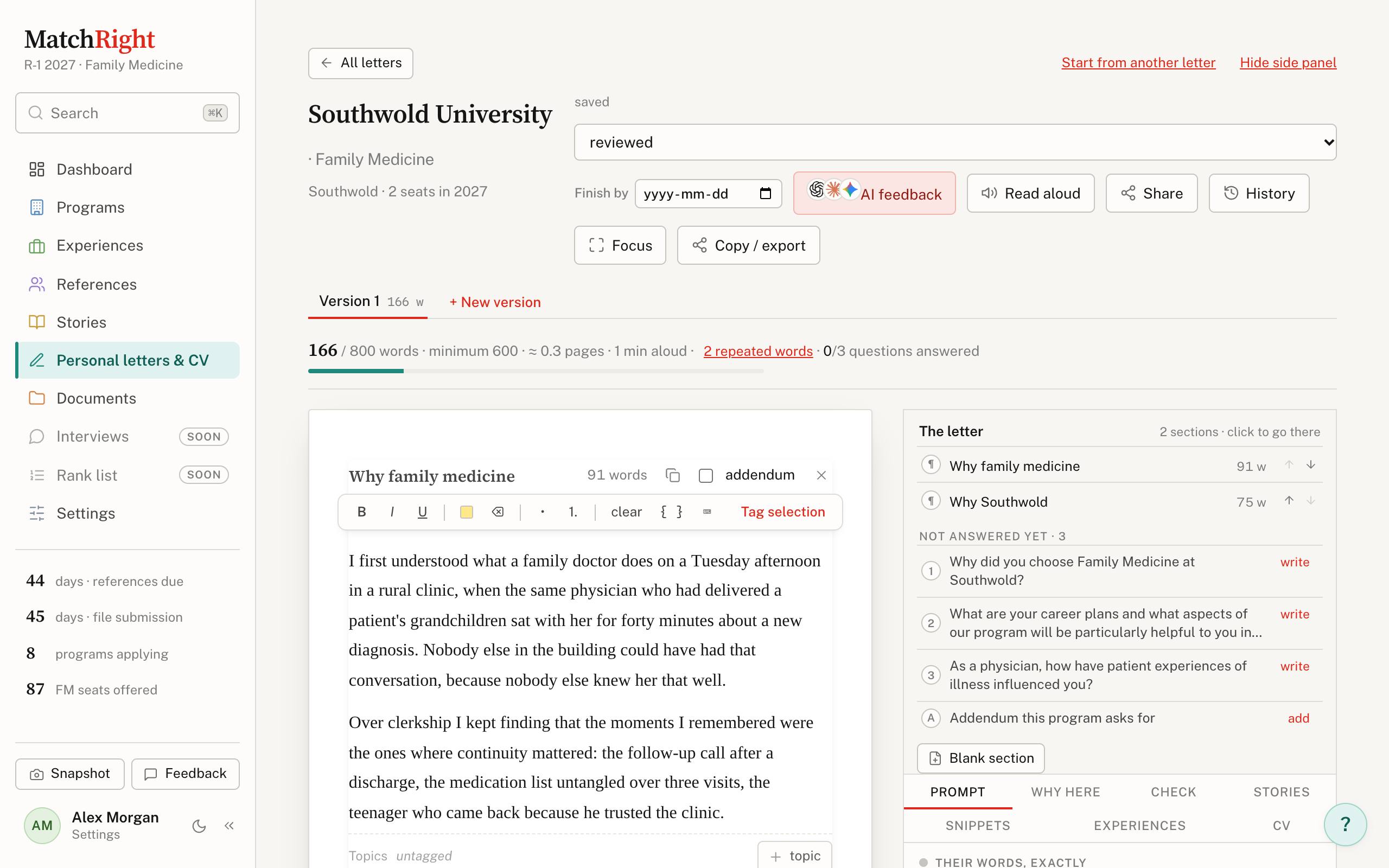
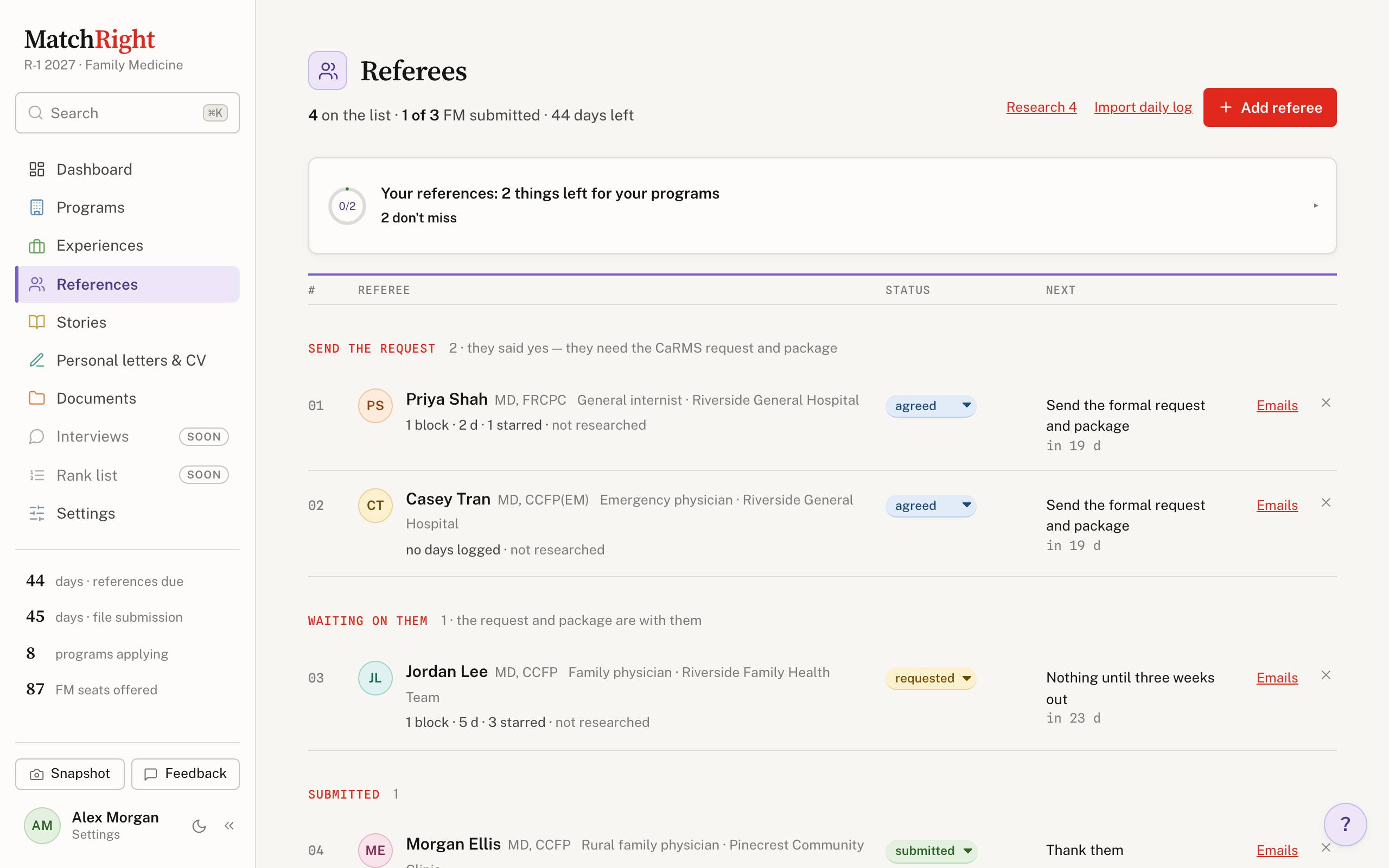
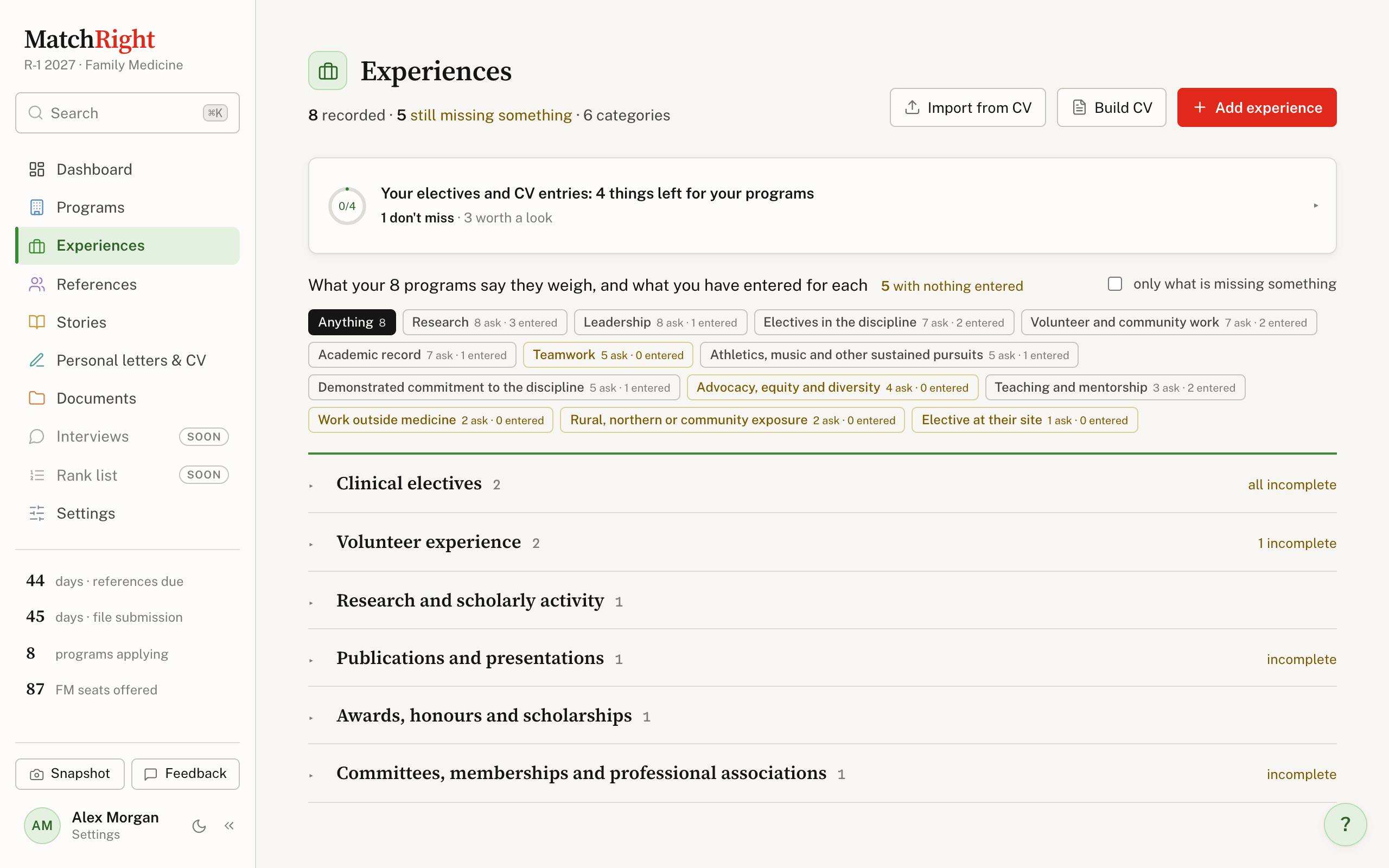
The Dashboard: days until references are due, programs, letters final, the cycle timeline and a calendar of CaRMS dates and program events. Personal letters: every program's letter with its word count, limit, questions answered and status, and a warning for a letter under the program's minimum. Writing a letter: the letter on a page, its word count against the limit, the program's questions still to answer, and buttons for AI feedback, read aloud, share and history. Referees, grouped by what each needs next: send the request, waiting on them, submitted, with when to follow up. Experiences, filed under the CaRMS categories, with what your programs say they weigh and how much you have entered for each.

The app itself, with a made-up applicant. School names are changed.

Start from the CV you already have

Give MatchRight your CV and it reads it into experiences: one per entry, filed under the CaRMS category, dated, and tagged with what it shows about you. You look over every row before anything is saved.

sample-cv.pdf · 1 page
Alex Morgan
MD Candidate, Class of 2027 · Northfield University · alex.morgan@example.com
Research
Research StudentMay 2025 – Present
Department of Medicine, Riverside General Hospital, Northfield
Supervisor: Dr. Jordan Lee
– Retrospective review of 214 hospital readmissions within 30 days of discharge
– Built the REDCap database and wrote the analysis plan
Publication
Poster: Readmission risk in patients over 65June 2026
Student and Resident Research Day, Northfield University
Volunteer
Finish-line medical tent volunteerOct 2024 – Oct 2025
Northfield City Marathon, Northfield
– Triaged runners alongside physicians and paramedics
Peer Tutor, AnatomySep 2024 – Apr 2025
Northfield University, Northfield
– Ran weekly cadaver lab review sessions for twelve first-year students
Leadership
Co-President, Clinical Skills Interest GroupSep 2025 – Present
Northfield University, Northfield
– Organised a clinical skills workshop series for 80 students with 6 residents
Awards
Dean's Summer Research Award2025
Northfield University
Review before saving
Press Import this CV and the proposals appear here.

Try it with your own CV. PDF, Word or text. It is read and shown here, and nothing is saved: no account, no copy kept.

Write a good paragraph once, use it where it fits

Highlight any passage in a letter and tag it with what it speaks to. Every other letter that asks about the same things offers it back, one click from your cursor.

Personal letter · Lakeview412 words

I first understood what a good teacher does in a cadaver lab on a Tuesday evening. Twelve first-year students were waiting for me to explain the brachial plexus, and I had prepared a lecture. Within five minutes it was obvious that none of them could see what I was pointing at. I put the notes down, split them into pairs, and spent the rest of the session moving between tables asking questions instead of answering them. By April the group's practical marks had climbed, and I had learned that teaching is mostly listening.

The same year I joined a research group at Riverside General, reviewing two hundred hospital readmissions. Building the database taught me to be exact about definitions; presenting the early findings taught me to be honest about what the numbers could not say.

Select a sentence or two above and press Tag selection beside it, or to try it on the first lines.
Personal letter · EastgateSnippets

Eastgate's program description asks about teaching, and about the moments that shaped how I work with people who know less than I do.

Snippets tagged teaching or research will be offered here,
because this letter's prompt asks about them.

Speaks to

One letter, made right for each program

Type {program}, {city} or {director} and each letter fills in its own. Every letter is checked against its program before you download it: over the limit, another school's name left in, a blank nobody filled. Switch programs below, then run the check.

Personal letter · Lakeview
Words

Get it read, then decide what to keep

Send a letter to a mentor, a resident or a friend. Each gets their own link and just types their name — no account. Or ask ChatGPT, Claude or Gemini: it opens with your letter already filled in. Either way, every suggestion shows up in your writing, old words crossed out and new ones beside them, and nothing changes until you press Accept.

Personal letter · Eastgate
Nobody has read this yet.
Press Share for review or AI feedback above.

The comments here are made up for the demo. Real reviewers see only your letter, never each other's comments.

Give your referees something to work from

For each referee, MatchRight builds a sheet from your own notes: when you worked together, what they saw you do, the days worth remembering and lines quoted from your evaluations, under the headings of the form they will complete. Then it bundles the sheet, your CV and your evaluations into one PDF, and reminds you when to nudge.

Asked to read someone's letter?

If an applicant sent you a MatchRight link, here is what to expect. You don't need an account, and it takes as long as reading the letter.

  1. Open the link and type your name. That's all the sign-in there is. The link is yours alone; keep it to yourself.
  2. Read the letter with the program's own question at the top, so you know what it has to answer.
  3. Comment or edit. Select words to leave a comment in the margin, or just type: your changes show as crossed-out and underlined, for the applicant to accept or not.
  4. Finish with a note and a short checklist. Your comments save as you go, so you can come back to it.

What the applicant sees, and what you don't

Only the applicant sees your comments. If they asked other people too, you never see each other's, and they never see yours.

The applicant can turn your link off at any time. You only ever see the letters they chose to share with you.

And the rest of the year

A Dashboard that says what's next

Opens with what to do first, what can wait, and the cycle's dates on a timeline, with anything slipping flagged in red.

What each program asks

Published requirements, word and page limits, reference counts, and the things only that program asks for, ticked off as you go.

Your calendar, with the cycle in it

CaRMS dates and CANPREPP events you can sign up for in one click, beside your own Google, Outlook or iCloud calendar.

Letters, start to submitted

Versions side by side, a real page count, Word or PDF in the standard format, and each answer ready to paste into CaRMS.

A CV from your Experiences

One click sets your CV in the same type as your letters, as a PDF or a Word file, checked against programs that cap its length.

Interview stories

One thing that happened, written once: the sixty-second spoken version and the letter-length version, side by side.

Ready to submit

Every program's letter, references, documents and CV in one list, with what's still to do for each in plain words.

Find anything, do anything

⌘K finds a program or a referee, and does things too: add a referee, start a story, switch to dark mode.

Light or dark, online or not

Follows your computer's theme, opens with your last data when the connection drops, and a short tour shows you around.

Ready when you are.

Start with the CV you already have.

Create an account